OpenDNS is a free alternate service to replace your ISP’s DNS service.
 There’s a simple way you can get to Web sites faster, and the great thing is that it won’t cost you a single penny. You can hack the way your PC uses the Domain Name System (DNS), the technology underlying all Web browsing. It’s far simpler to do than you might imagine.
Before you start, let us see how a DNS works. When you type in a URL such as www.google.com, that URL needs to be translated into a numeric IP address that Web servers and Internet routers can understand. When you type in a URL, a DNS server does the translation, from www.google.com to 74.125.45.100, for example. Type this IP address to your browsers address bar and feel how fast the page loads.
DNS servers live on the Internet, and your computer contacts them with the request to do that translation, which is commonly called name resolution. When you use an ISP, your computer will automatically use the default DNS servers specified by your ISP, you typically don’t need to set up DNS in any way. If you’re on a corporate network, your systems administrator may have configured it.
If there’s a delay in contacting the DNS server, or if the DNS server takes too much time resolving the address, you’ll face a delay in getting to a Web site. So even if you’ve got the world’s fastest pipe, your Web surfing will be slowed down.
If you could speed up the name resolution in some way, you’d be able to speed up your Web surfing. And that’s exactly what we are going to do.
By placing company servers in strategic locations and employing a large cache of the domain names,OpenDNS usually processes queries much more quickly than your ISP’s DNS service, thereby increasing page retrieval speed.
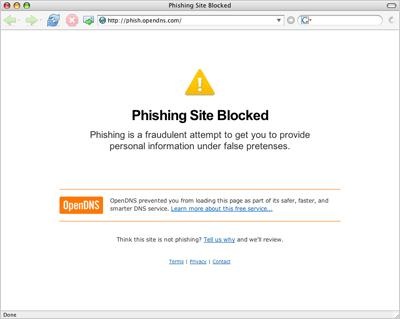
The service includes other benefits too, such as phishing filter, domain blocking and typo correction (for example, typing google.cm instead of google.com). By collecting a list of malicious sites, OpenDNS blocks access to these sites when a user tries to access them through their service.
Advantages:
- Faster internet surfing experience
- Easy to Setup
- Universal (users all over the world from various internet service providers can use this)
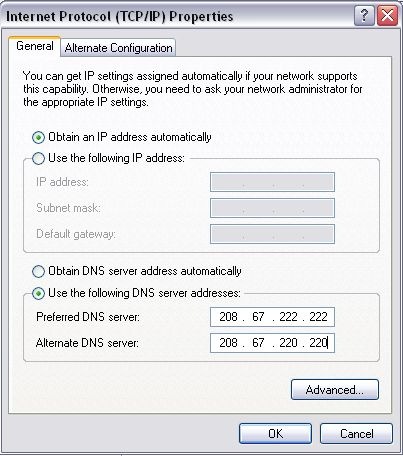
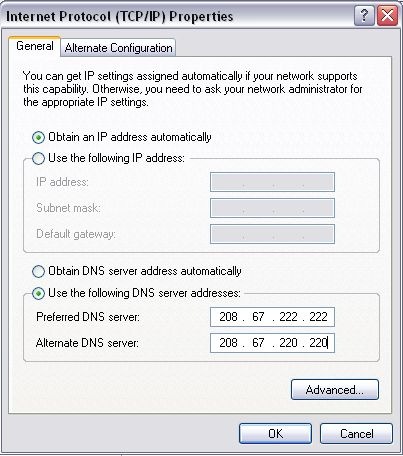
What you need to do is to change your DNS servers information on your computer or router to 208.67.222.222 as primary DNS server and 208.67.220.220 as secondary server.
Changing DNS settings on Windows XP
Network Connections—>Local Area Connection—>Properties—>Internet Protocol(TCP/IP)
They make their money when you misspell a domain name, or DNS doesn’t resolve, and you’ll get a search page with their advertisers.
OpenDNS recently launched Phishtank, where users around the world can submit and review suspected phishing sites.
So why don’t you try out ?
Possibly Related Posts: